Split Combined Variant Columns into Shopify Options
Supplier files often cram variants into one column like "Red / Large". Here's how Portaim splits it into real Shopify Option1 / Option2 values automatically.
Free plan available · No credit card required · Shopify connection optional
The problem: one “Variant” column, not two
Supplier product files rarely arrive with a Shopify-shaped variant structure. A common pattern is a single column that packs two attributes together — a value like Red / Large or Blue-M in a “Variant”, “Attributes”, or “Option” column.
Shopify does not read that. Its product CSV expects up to three option axes as separate fields: Option1 Name / Option1 Value, Option2 Name / Option2 Value, and Option3 Name / Option3 Value. If you import a combined value as-is, Shopify treats the whole string as one option value — and you end up with one product carrying a single strange variant instead of the color-and-size grid you expected.
Conceptually, this is what has to happen for every row:
The manual version of this is repetitive spreadsheet work:
- add two new columns to the supplier file;
- write a formula to split each combined value on the correct separator;
- fill down for every product row;
- check that no row has three attributes when Shopify only sees two;
- repeat the entire routine next month when the supplier sends an update.
How Portaim helps
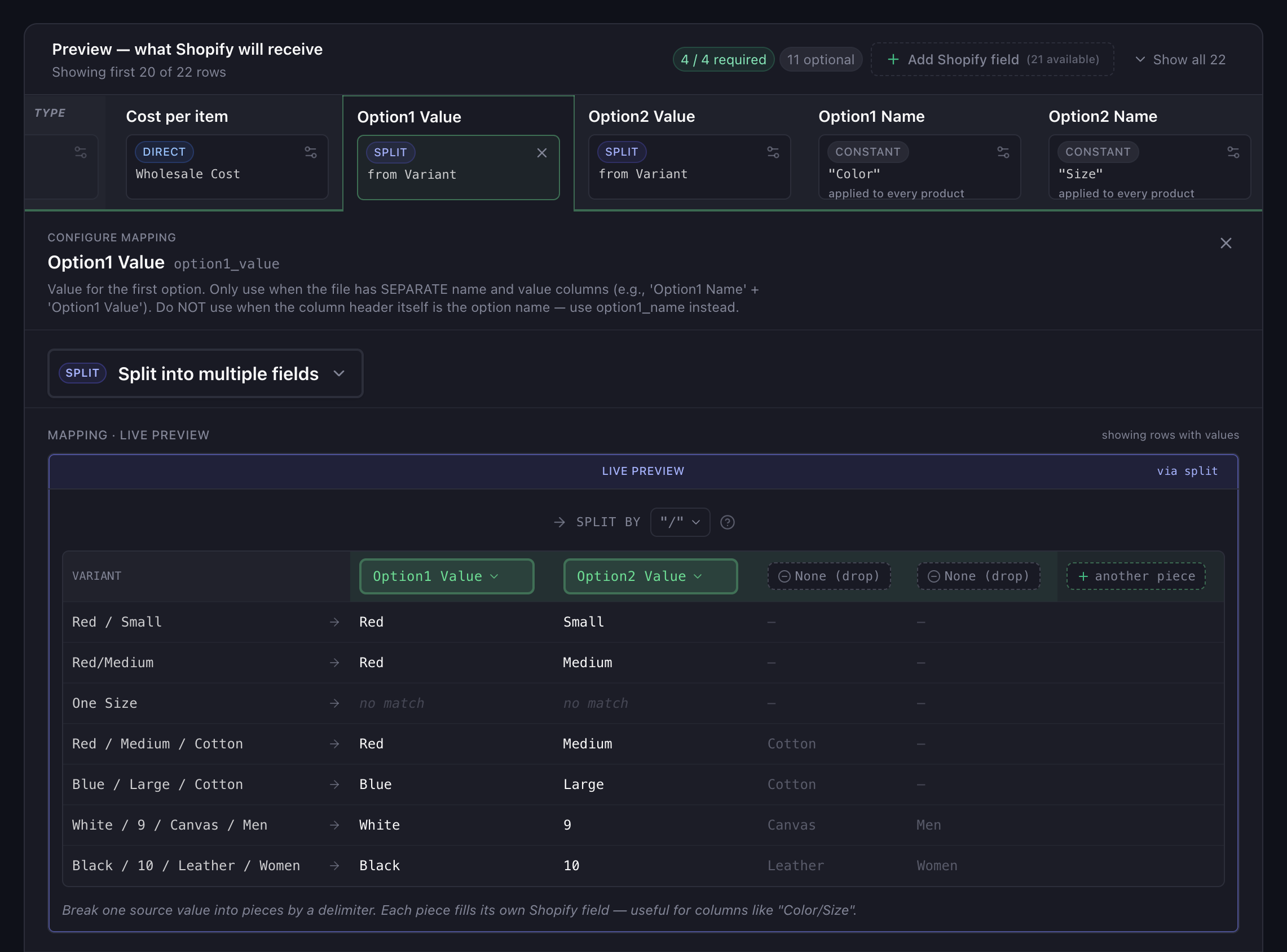
Portaim recognizes the shape of a combined column during mapping. Slash, pipe, and spaced-hyphen (" - ") separators are detected automatically and the mapper offers to split the column into two or three Shopify option fields, with a live preview of the values on your first rows. Any other separator — a comma, a bare hyphen, or a custom character — works too: switch the column to Split in the editor and pick the separator manually.
You keep control at every step:
- the separator the split uses — slash, pipe, spaced-hyphen, comma, or anything else you type in;
- the Shopify option axis each piece maps to (
option1_value,option2_value,option3_value) — supplier columns usually do not carry that mapping context; - which pieces you want to keep — if the column contains “Red / Large / Cotton” but you only want to model color and size, you can extract just the first two pieces and leave the third out;
- the preview updates as you change any of those, so you see exactly what will land in Shopify before export.
Edge cases the split has to get right
A naive “split on /” script breaks on real supplier data. Portaim’s split is a delimiter plus a per-piece Shopify-field assignment you can review, and the composition layer emits explicit warnings when a row doesn’t produce enough pieces to fill every assigned field rather than exporting missing option values:
| Case | Example row | What Portaim does |
|---|---|---|
| Two-way split | Red / Large | Two piece assignments map the pieces to option1_value and option2_value |
| Three-way split | Red / Large / Cotton | A third piece assignment adds option3_value. Shopify supports at most three option axes, so a fourth piece has no valid target and is dropped from the split. |
| Row that doesn’t produce enough pieces | One Size in a column of Colour / Size values | A split_partial_match warning is emitted for that row and the captures are discarded instead of exporting with missing option values. |
| Empty variant cell | (blank) | Same split_partial_match outcome as the previous row: captures discarded, row surfaces in the fix step rather than being exported with empty option values — a state Shopify treats as delete-variant on updates. |
The last row matters more than it looks. Shopify’s CSV import treats a row with the same handle but missing option values as an instruction to change the variant structure — which can remove existing variants from a live product. Flagging those rows before export is safer than letting them through.
Export — what the Shopify payload looks like
After the split is confirmed and validation passes, one supplier row with a combined variant column becomes one Shopify variant row with the option fields populated. A product with three variants shipped as three supplier rows — each row shares the product’s Handle, and each carries its own option values.
Handle | Title | Option1 Name | Option1 Value | Option2 Name | Option2 Value | Variant SKU |
|---|---|---|---|---|---|---|
| basic-tee | Basic Tee | Color | Red | Size | Large | TEE-RED-L |
| basic-tee | Color | Red | Size | Medium | TEE-RED-M | |
| basic-tee | Color | Blue | Size | Large | TEE-BLU-L |
Direct Shopify export sends the same shape through the Admin API — the split happens once during mapping and both export paths receive the result.
Repeat imports from the same supplier
Most merchants do not import a supplier catalog once. The same file layout arrives next month with new products, and re-splitting a combined variant column by hand every time does not scale.
Portaim recognizes when a supplier file with the same column layout is re-uploaded and reapplies your previous mapping automatically — including the split rule, the detected separator, and your chosen option-axis names. New products flow through with variants intact; you review the fix step and export.
When this fits
Portaim’s split rule is a good fit if:
- your supplier sends a single “Variant”, “Attributes”, or “Option” column with combined values like
Red / Large; - the separator is consistent within the column, even if it’s not consistent across suppliers;
- your products have up to three option axes (Shopify’s ceiling);
- you want the same mapping to reapply on next month’s file without redoing the split by hand.
Portaim’s split rule is not the right tool if:
- your supplier already provides
Option1 Name/Option1 Valueas separate columns — those map directly with no split needed; - your products have no variants at all (one row per product, no option columns);
- your variant attributes live in the row’s SKU code and would need to be parsed with a positional or structural rule rather than a simple separator — contact us at contact@portaim.com before uploading if that’s your case.
Manual CSV editing vs Portaim
The manual path works. It also does not scale. To split combined variant values by hand for a Shopify import you would:
- open the supplier file in Excel or Google Sheets;
- add two or three new columns for the split values;
- write a
SPLIT()or text-to-columns transformation; - manually enter
Option1 NameandOption2 Namefor every row; - audit rows where the split fell over (extra attributes, single-value cells, weird whitespace);
- check the finished CSV against Shopify’s expected format before importing;
- redo all of it next month.
Portaim replaces that with a mapping step:
Supplier CSV/XLSX → Portaim mapping (detect + split + validate) → Shopify-ready export
The split rule is one setting on one field card. The mapping is remembered for the next upload. Rows that don’t produce enough pieces don’t disappear silently — they show up in the fix step where you can decide what to do with them.
For the full mapping-and-validation flow around this step, see the supplier CSV to Shopify use case or the Portaim docs.
Frequently asked questions
What if my supplier uses a different separator, like a comma instead of a slash?
The split rule is a delimiter you pick in the mapping editor, so any consistent separator works — a slash ("Red / Large"), a comma ("Red, Large"), a hyphen ("Red-Large"), or a pipe ("Red|Large"). Rows where the delimiter doesn't produce enough pieces to fill every assigned Shopify field emit a warning in the fix step rather than exporting missing option values.
Can Portaim split three variant attributes (color, size, material) from one column?
Yes. Shopify supports up to three option axes (Option1, Option2, Option3), and the split rule assigns each piece to one of them — two-way splits use option1 and option2, three-way splits also use option3. Shopify has no fourth option axis, so a fourth piece has no valid target and is dropped by leaving it unassigned in the editor.
What happens to rows where the value doesn't have enough pieces for the assigned option axes?
Those rows are flagged with a split_partial_match warning during validation, not silently exported with missing option values. You can review them in the fix step and either correct the source value, remap that row manually, or exclude it from export.
Does this work the same for a direct Shopify export as for a downloaded CSV?
Yes. The split happens during column mapping, so both export paths receive the same fully populated Option1 Name / Option1 Value / Option2 Name / Option2 Value fields per row.
Will this create duplicate variants if I re-import the same file?
Not by itself. Duplicate detection depends on your SKU and Handle strategy, which Portaim also validates before export. If your supplier reuses SKUs or Handles across variants, Portaim flags the duplicates in the fix step so they do not overwrite existing Shopify products unexpectedly.
Turn one combined column into real Shopify variants
Upload your supplier file, let Portaim recognize combined variant columns and split them into Shopify Option1 and Option2 values automatically, then export with variants intact.