Bulk Import Product Image Galleries from a Supplier CSV
Supplier files often spread product photos across several columns. See how Portaim turns image_1, image_2, image_3 into a real Shopify image gallery.
Free plan available · No credit card required · Shopify connection optional
The problem: many image columns, one gallery
Product photography rarely lives in one place in a supplier file. Wholesalers ship files with three to ten image columns per row — image_1 through image_8, or front_image, back_image, detail_1, detail_2. Some products have every column populated, some have only the front photo.
Shopify does not accept that shape. Its product CSV expects one image per row — each with the product’s Handle, one Image Src, and an Image Position. If you import a supplier row with multiple image columns as-is, Shopify only picks up whichever column you mapped to Image Src; every other photo is discarded.
The shape has to flip — from wide (many columns per row) to long (many rows per product):
Done by hand, this is the loop:
- duplicate each product row once per image column that has a value;
- on each duplicate, keep the
Handle, clear the other product fields, and fillImage Srcwith the URL from one image column; - set
Image Positionto1,2,3on each duplicate; - check no row has a stale
TitleorVendorthat will overwrite the product on re-import; - repeat next month.
How Portaim helps
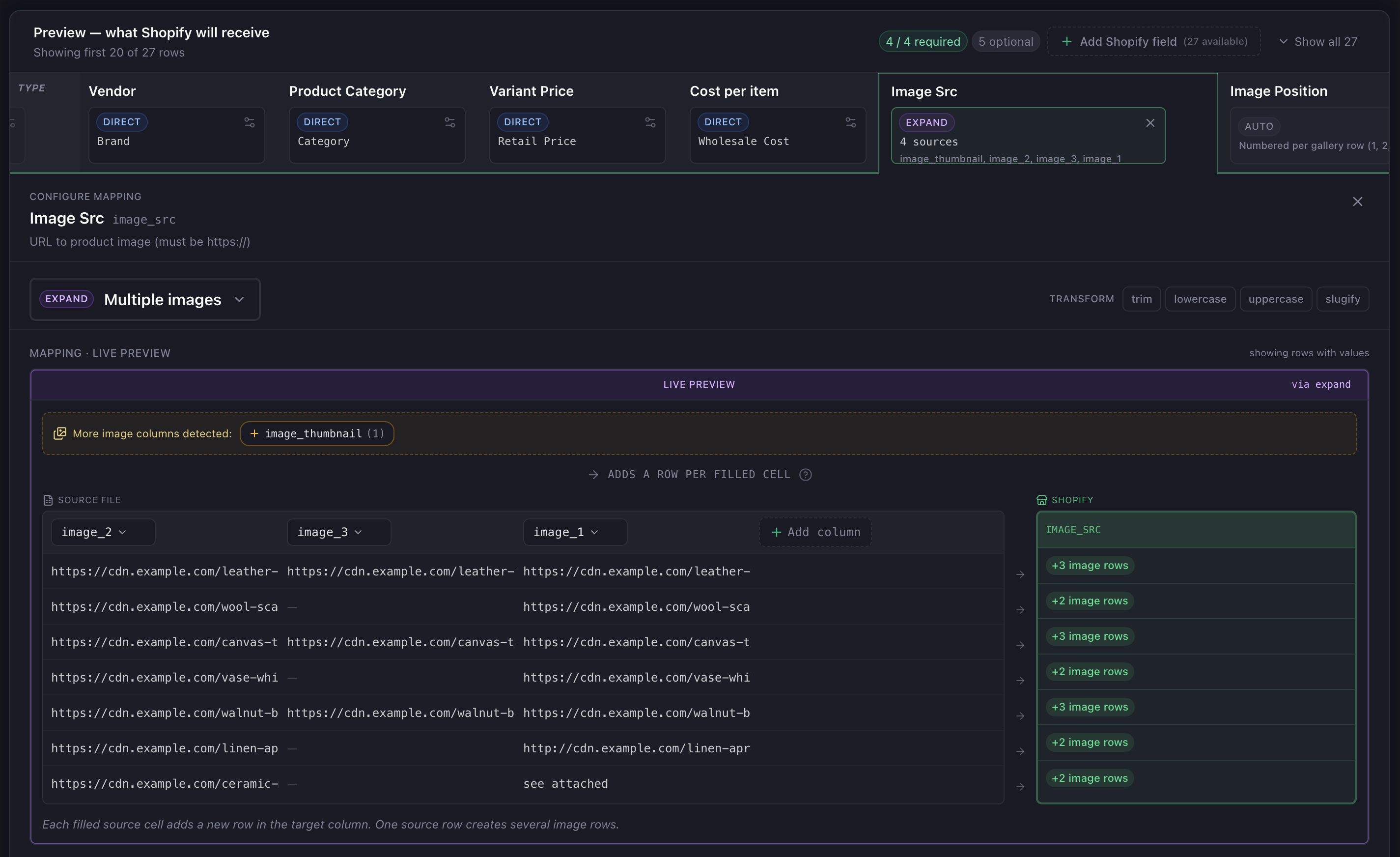
Portaim recognizes URL-shaped columns during mapping and offers to expand them into a Shopify image gallery. Rather than picking one column and losing the rest, the expand rule turns each populated image URL into its own Shopify row — sharing the product’s Handle and carrying its own Image Position.
You keep control of:
- which supplier columns are grouped into the gallery (drop
thumbnailif you do not want the low-res version at position 1); - the column order — that order determines the
Image Positionin Shopify, so the first non-empty column becomes the primary image; - detected-but-dropped columns are surfaced separately — if you remove an image column from the group, a “More image columns detected” chip lets you add it back with one click, so nothing gets silently missed.
Alt text is a separate mapping
Shopify’s Image Alt Text is one value per product — it lands on the product’s position-1 image row, which is the row Shopify actually shows in product listings and merchandising. It is not part of the image expand.
Two paths:
- If your supplier file has an alt-text column, map it directly to
image_alt_text. The value copies straight to the product’s position-1 row. - If it doesn’t, the mapping page shows a “fields we can generate with AI” hint — one click adds
image_alt_textas an empty column. In the fix step, an “Enhance with AI” group asks the AI to write descriptive alt text per product from its title, description, and other context. Values are capped at 125 characters to keep them within accessibility best practice.
Sparse and inconsistent galleries
Real image columns are rarely uniform. Portaim handles the common trouble cases explicitly rather than silently:
| Case | Supplier row | What Portaim does |
|---|---|---|
| Sparse gallery | image_1 filled, image_2–image_8 blank | One gallery row exported. Blank cells do not produce empty Image Src rows, and Image Position stays sequential from 1 based on the URLs that were actually emitted. |
| Duplicate URL across columns | Same URL in image_1 and image_thumbnail | Exact-string deduplication skips the repeated URL, so the same photo doesn’t appear twice in the Shopify gallery. |
| Non-URL text in an image column | See attached, filename with no path | Flagged by the URL-format rule during validation, not exported as a broken URL. |
http:// instead of https:// | http://cdn.supplier.com/img.jpg | Warning surfaced during validation — Shopify prefers https for public image imports, and the add-protocol auto-fix can upgrade it. |
| All image columns blank on a product | Every image_* column empty | An expand_zero_rows warning fires so you notice the product will land in Shopify with no photos rather than the outcome being silent. |
Shopify’s CSV importer needs to reach each URL to fetch the photo, so publicly accessible https URLs are required. Portaim flags URLs that Shopify would reject before you hit export, not during Shopify’s side of the import.
Export — what the Shopify payload looks like
After mapping, a supplier row with three populated image columns becomes three Shopify rows — each sharing the same Handle, each carrying its own image URL and position:
Handle | Title | Image Src | Image Position | Image Alt Text |
|---|---|---|---|---|
| leather-tote | Leather Tote | https://cdn/…/front.jpg | 1 | Leather Tote |
| leather-tote | https://cdn/…/back.jpg | 2 | ||
| leather-tote | https://cdn/…/detail.jpg | 3 |
Only the first row of each product carries the full product fields (Title, Vendor, Type, Image Alt Text, etc.). Subsequent rows leave those blank so Shopify treats them as gallery rows for the same product, not new products with the same handle. Direct Shopify export produces the same shape through the Admin API.
Portaim’s “Preview — what Shopify will receive” tab shows the same shape in the app before you export — row-type badges make the grouping obvious at a glance:
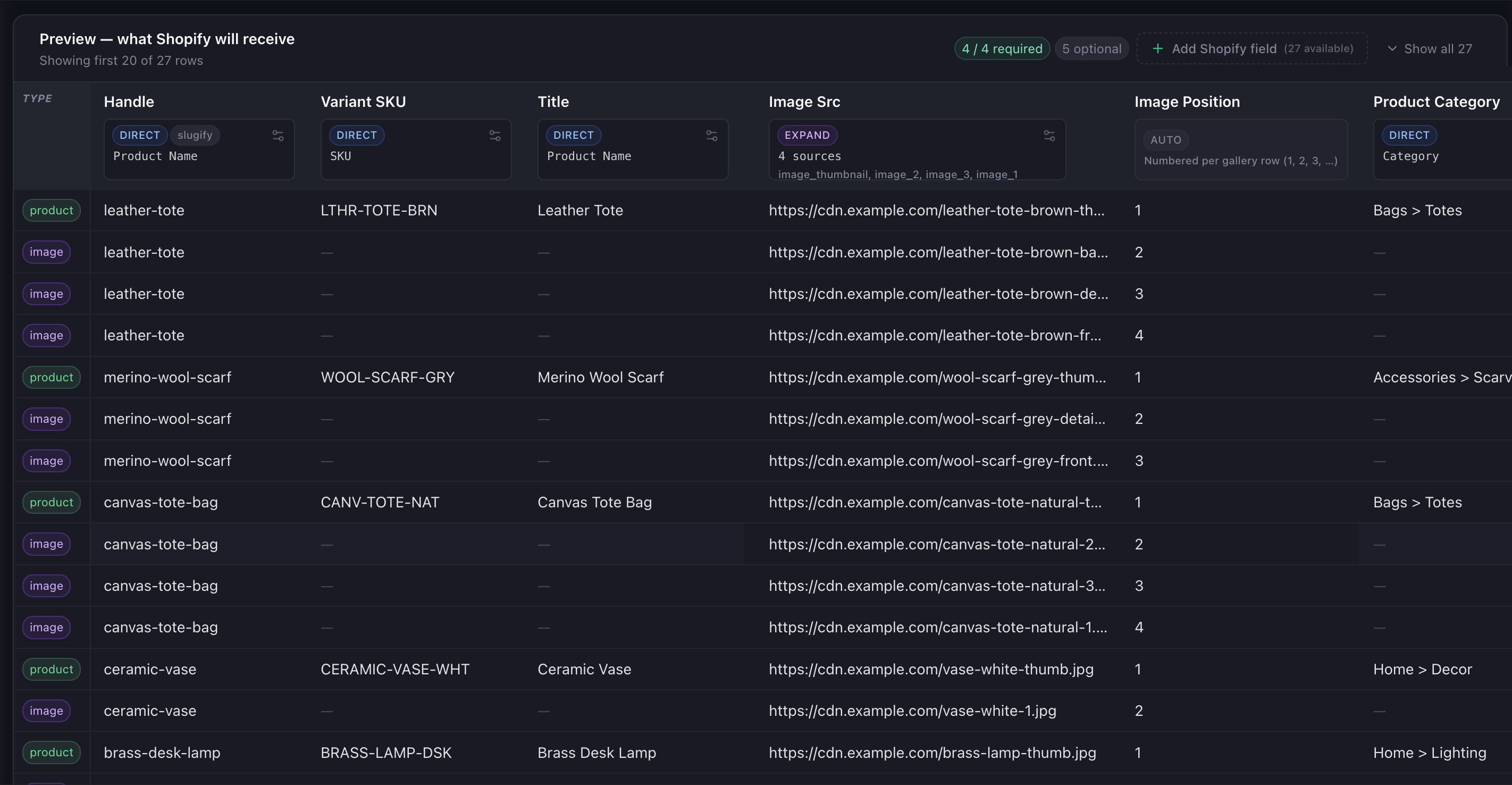
product for the row carrying product fields, purple image for each subsequent gallery row. Notice how the sparse and duplicate cases show up in the row count per product: leather-tote and canvas-tote-bag each get four rows (product + 3 images), the wool scarf gets three (image_3 was empty), and the ceramic vase gets two (image_1 and image_2 held the same URL, dedup collapsed them).
Repeat imports from the same supplier
A supplier’s image-column layout is one of the least fun parts of manual CSV work to redo every month. Portaim recognizes when the same layout is uploaded again and reapplies your expand rule — which columns are grouped and their order — along with your alt-text mapping (whether it was a supplier column or an empty column added for AI generation).
New products flow through with full galleries; discontinued products come out of the export set the same way any other row does; you spend your time on new merchandising decisions rather than re-teaching Portaim how the supplier ships photos.
When this fits
Portaim’s expand rule is a good fit if:
- your supplier file has multiple image columns per product row (three, five, eight);
- the columns hold public image URLs that Shopify will be able to fetch;
- you want a real Shopify image gallery, not just the front photo;
- the same supplier will send another file next month with a similar layout.
Portaim’s expand rule is not the right tool if:
- your supplier already ships images as one URL per row (each photo on its own line with a repeated
Handle) — a straightImage Srcmapping is enough; - your image URLs are behind authentication or on a private network — Shopify cannot fetch them regardless of tooling;
- your supplier attaches images as separate binary files rather than URLs — those need to be uploaded to a public host (S3, R2, Cloudinary) before either Portaim or Shopify can use them.
Manual row duplication vs Portaim
The manual path is the loop from the top of this page. For a catalog with 500 products and up to eight images each, that is potentially 4,000 spreadsheet operations — every duplication a chance to accidentally overwrite a product field or miss a photo.
Portaim collapses it to a single mapping choice:
Supplier CSV/XLSX → Portaim mapping (group + expand + validate URLs) → Shopify-ready export
You group your image columns once, order them once, and let the expand rule handle every product row. Invalid URLs and http:// vs https:// issues surface in the fix step before export, not in Shopify’s import error log.
For the full mapping-and-validation flow around this step, see the supplier CSV to Shopify use case. For splitting a “Red / Large” variant column into real Shopify options, see the variant options guide.
Frequently asked questions
What happens if a product only has one image column filled in and the rest are empty?
The product exports with a single image row. Empty image columns do not produce empty gallery rows — only populated cells contribute images. Products with one photo look the same in Shopify as if the supplier file had only one image column.
Does Portaim remove duplicate image URLs that appear in more than one column?
Yes — exact-string duplicates are skipped, so the same URL repeated across image_1 and a thumbnail column becomes a single gallery row, not two. URLs that differ only in protocol (http vs https) or a cache-buster query parameter are treated as different today; you can spot and remove those in the fix step before export.
Can I control which image becomes the primary (position 1) image?
Positions are assigned by the order the image columns are grouped in the expand rule — the first non-empty URL becomes Image Position 1, then Position 2, and so on. If your supplier lists images in the order you want them shown in Shopify (front, back, detail), the default grouping already works. If not, the column order in the group determines the outcome.
Do the image URLs need to be publicly accessible before I upload the file?
Yes. Shopify needs to fetch each image URL to import the photo, so URLs behind authentication or on internal networks do not work. Portaim flags invalid or non-http(s) URLs during validation so you catch them before export instead of during Shopify’s import.
Does this work for variant-specific images, or only product-level galleries?
This flow builds the product-level image gallery — Shopify’s Image Src and Image Position fields. Image Alt Text is mapped separately (see “How Portaim helps”) because it’s one value per product, not one per image row. If your supplier file has a dedicated variant-image column, you map that separately to Shopify’s Variant Image field — that mapping is a straight copy, not an expand.
Turn scattered image columns into a real Shopify gallery
Upload your supplier file, let Portaim recognize your image columns and expand them into a proper Shopify image gallery, then export with every photo in the right order.