Import supplier CSV files into Shopify without manual cleanup
Supplier product files rarely arrive in Shopify’s exact format.
Portaim helps you upload supplier CSV, XLSX, or XLS files, map supplier columns to Shopify product fields, validate product data, fix common issues, and export products to Shopify — without spending hours cleaning spreadsheets by hand.
Free plan available · No credit card required · Shopify connection optional
The problem with supplier CSV files
Shopify can import products from a CSV file, but supplier spreadsheets are usually not prepared for Shopify. Shopify expects a specific column layout — and supplier files almost never use it.
A supplier file may have columns like:
| Supplier column | Example value | Why it can be a problem |
|---|---|---|
| Product Name | Premium Leather Chair | Needs to map to Shopify’s Title |
| Retail Price EUR | €129,90 | Currency symbol and comma decimal need normalization for Variant Price |
| Item Code | CHAIR-BLK-01 | Should map to Variant SKU |
| Photo 1 | http://supplier.com/img.jpg | Needs to map to Image Src; https:// is usually safer for public image URLs |
| Availability | In stock | Does not directly match Shopify’s active / draft / archived statuses |
| Weight KG | 1,4 kg | Needs cleanup before it can be exported into Shopify-compatible weight fields |
A direct import often means manual work:
- renaming supplier columns to Shopify’s expected names;
- copying values into Shopify’s expected fields;
- fixing prices, weights, and booleans;
- checking duplicate or missing SKUs;
- validating image URLs;
- making sure required fields like
TitleandVariant Priceare populated; - repeating all of it the next time the supplier sends a file.
Portaim is built for this exact workflow.
How Portaim helps
1. Upload your supplier file
Upload a CSV, XLSX, or XLS file from your supplier.
You can use Portaim even if the file does not match Shopify’s CSV format yet. During upload you choose the sheet and header row so Portaim understands where your product data starts.
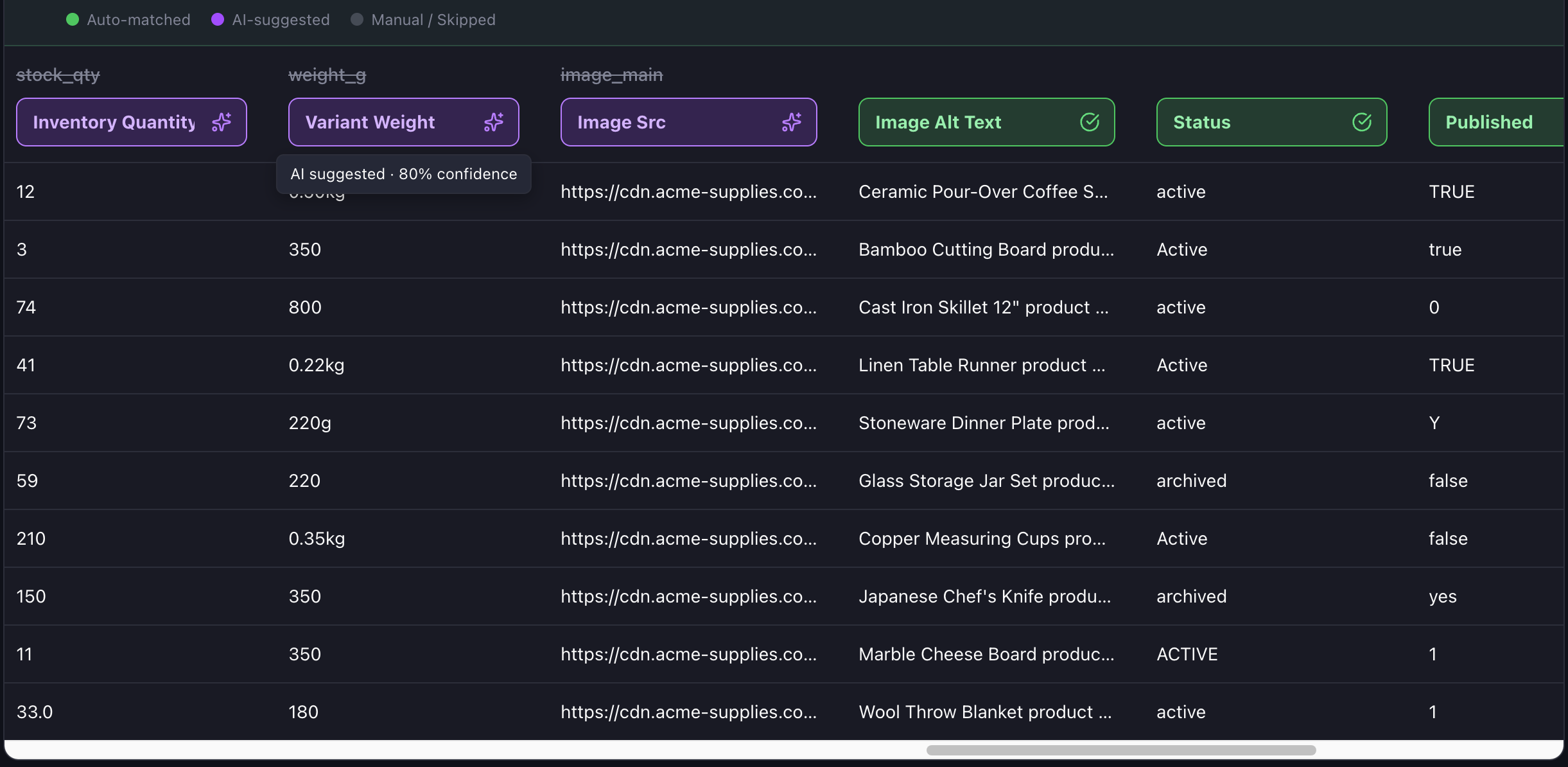
2. Map supplier columns to Shopify fields
Portaim suggests mappings between supplier columns and the official Shopify product CSV fields.
For example:
| Supplier column | Shopify field |
|---|---|
| Product Name | Title |
| Description | Body (HTML) |
| Item Code | Variant SKU |
| Retail Price EUR | Variant Price |
| Wholesale Cost | Cost per item |
| Photo 1 | Image Src |
| Brand | Vendor |
| Category | Type |
Review every suggestion before confirming, override any that does not fit, and Portaim can reuse your corrections the next time a file with the same column layout is uploaded.
3. Catch Shopify CSV import issues before export
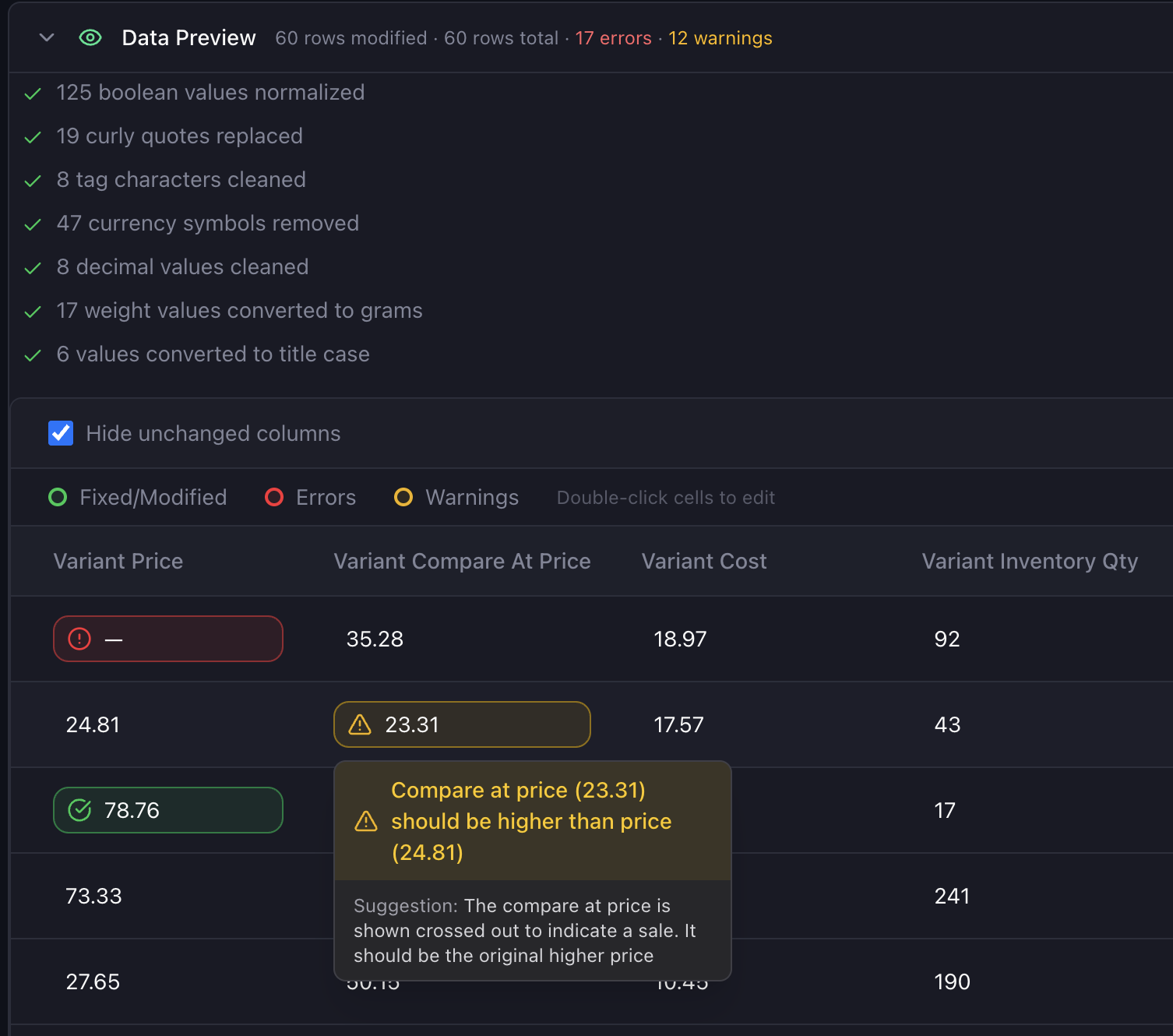
Before sending products to Shopify, Portaim checks your mapped data against common CSV import issues and Shopify field expectations.
Common supplier-file issues and what Portaim does about them:
| Issue | Example | Why it matters | Portaim |
|---|---|---|---|
Missing Title | empty product name | Product rows need enough product data to be created correctly | Flagged as a required-field error |
| Blank or invalid price | —, €19,90 | Shopify price fields expect normalized numeric monetary values | Flagged before export or normalized where possible |
| Currency symbol in price | €19,90 | Currency symbols and comma decimals can cause import or formatting problems | Auto-fix can strip the symbol and normalize the decimal |
Duplicate Variant SKU | same SKU on multiple rows | Duplicate SKUs make inventory tracking and product updates harder to trust | Flagged across rows so you can review them |
Invalid Image Src | supplier-image-1 | Shopify needs publicly accessible image URLs during CSV import | Flagged as an invalid URL |
http:// image URL | http://… | Public https:// image URLs are safer and more reliable for imports | Warning before export |
| Status not in Shopify’s list | enabled, live, yes | Shopify product status uses values such as active, draft, or archived | Suggests the closest valid value |
| Weight format issue | 1,4 kg | Weight values need cleanup before export into Shopify-compatible fields | Flagged or converted where possible |
| Compare-at price issue | 15.00 / 15.00 | Compare-at price should usually represent a higher original price | Flagged as a warning |
Portaim also catches variant-related problems that are easy to miss during spreadsheet cleanup — for example, missing option names, duplicate option combinations, or incomplete option columns.
Variants — color, size, and other product options
Variants are one of the trickiest parts of any Shopify CSV import. Shopify represents variants as multiple rows that share the same Handle, with each row carrying explicit option fields such as Option1 Name and Option1 Value. Products with two or three option axes use Option2 Name / Option2 Value and Option3 Name / Option3 Value as well.
Supplier files vary widely in how they handle this:
- Shopify-style. Some supplier files already include explicit
Option1 Name/Option1 Valuecolumns. Portaim maps these directly. - Flattened columns. Some files use a single column per variant attribute, such as
Color,Size, orMaterial, where each row contains the value for that variant. Portaim helps you map these to Shopify’s option columns and flags missing option names so your variant structure is not changed unexpectedly during import or update. - Single-variant catalogs. Some suppliers send one row per product with no variants. These map to Shopify without option columns.
Portaim catches common variant traps before export, including:
- duplicate option combinations on the same product;
- option values without a matching option name;
- non-sequential option slots, such as
Option2defined withoutOption1; - products that exceed or come close to Shopify’s current product structure limits, such as option axes, variant count, or media count.
Export to Shopify or download a Shopify-ready CSV
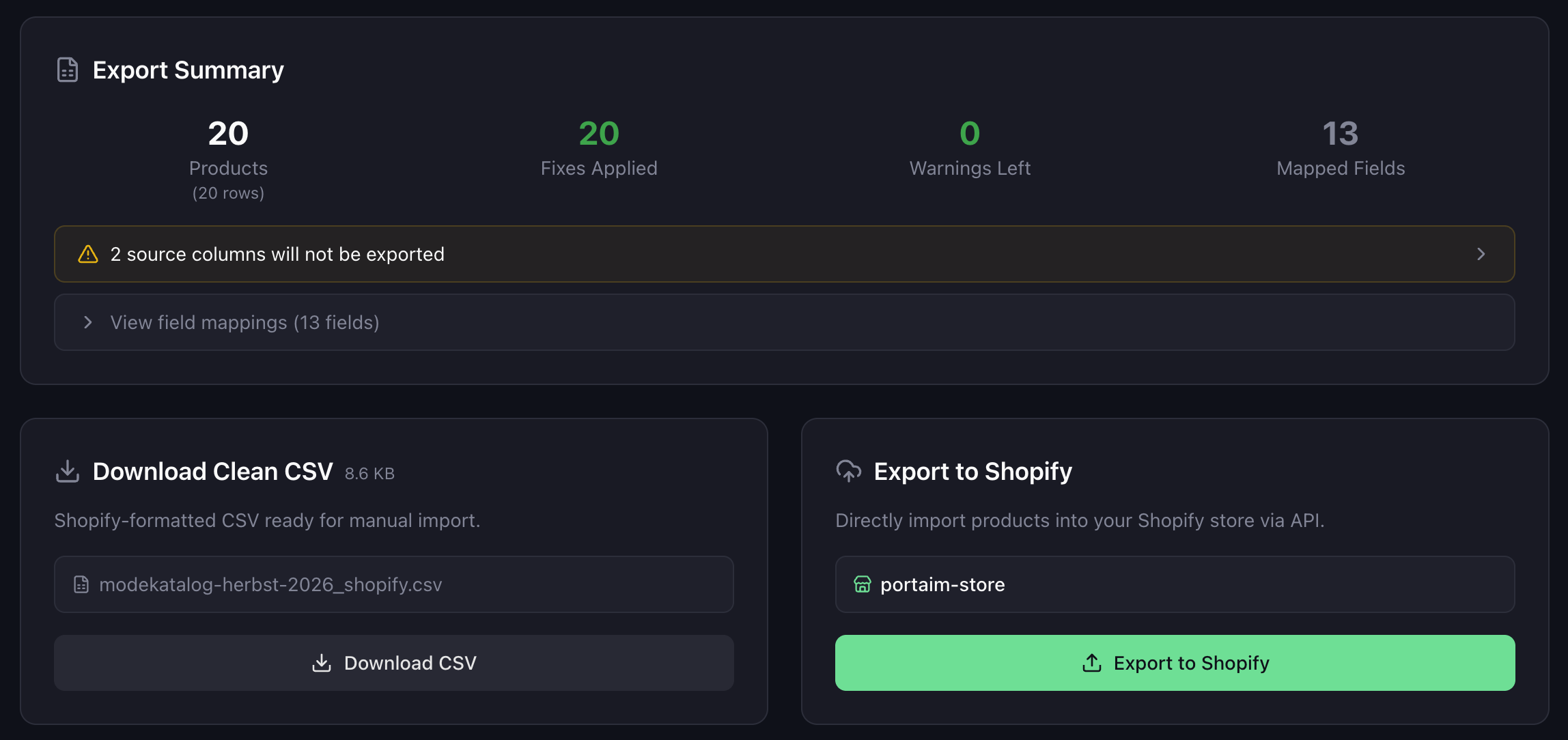
After mapping and validation, you choose how to export:
- Direct Shopify export — connect your Shopify store and Portaim sends products via the Shopify API.
- CSV download — download a Shopify-formatted CSV and import it manually in Shopify admin.
Connecting your Shopify store is optional. You can use Portaim end-to-end and never connect a store — download the clean CSV, review it, and import it on your own schedule.
Built for repeat supplier imports
Most merchants do not import supplier files only once. The same supplier sends an updated catalog next month, then the month after.
Portaim recognizes when a supplier file with the same column layout is re-uploaded and applies your previous mapping automatically, so you can move to validation with less re-mapping and less setup. The matching is based on the file’s column structure — a fingerprint of the headers — so you do not need to remember a template name.
This is especially useful when:
- the same supplier sends regular product updates;
- each supplier has a different spreadsheet format;
- you work with multiple brands or wholesalers in parallel;
- you want a repeatable import process instead of manual cleanup every time.
When this page is for you
Portaim is a good fit if you:
- sell on Shopify;
- receive supplier, wholesaler, distributor, or dropship CSV/XLSX files;
- spend time cleaning product spreadsheets manually;
- need to map supplier columns to Shopify fields;
- want to catch CSV import issues before export;
- want to reuse mappings for repeat supplier files.
Portaim may not be the right fit if:
- you only add a handful of products manually;
- your supplier already provides a perfect Shopify-ready CSV;
- you need a full ERP or PIM system with inventory sync, accounting, and order management;
- you want a custom one-off migration project rather than a self-service import tool.
Why not just import the supplier CSV directly into Shopify?
If a supplier file already follows Shopify’s expected CSV format, you can import it directly.
But most supplier files do not. They use different headers, localized values such as German Beschreibung or French Prix, currency symbols, custom availability values, http image URLs, missing or extra columns, and inconsistent SKUs.
Portaim sits between the supplier file and Shopify:
Supplier CSV/XLSX → Portaim mapping + validation + fixes → Shopify-ready export
The goal is not to replace Shopify’s import. The goal is to prepare supplier data so the import is less likely to fail, your variant structure is not changed unexpectedly, and the same cleanup does not need to be repeated manually every month.
For a feature-by-feature breakdown and pricing, see the Portaim homepage.
Frequently asked questions
Can I import Excel supplier files, or only CSV?
You can upload CSV, XLSX, and XLS files. Portaim parses all three, then exports a Shopify-ready CSV or pushes products directly to Shopify.
Do I need to connect my Shopify store?
No. Connecting Shopify is optional — you can use Portaim end-to-end and just download a Shopify-ready CSV, then import it in Shopify admin yourself.
Can Portaim handle different supplier formats?
Yes. Portaim is designed for supplier files with different headers, languages, and structures. You map columns once with AI assistance, override any suggestions that do not fit, and Portaim can reuse the mapping the next time the same supplier sends a file with the same layout.
Does Portaim change existing products?
Portaim prepares and exports product data; it does not modify Shopify products on its own. When you export to Shopify, review the export settings carefully — especially when working with existing SKUs or product updates.
How does Portaim handle product variants?
Each variant can be exported as a separate row sharing the same Handle, with Option1 Name / Option1 Value and Option2 / Option3 fields if applicable. Portaim flags variant problems before export, such as duplicate option combinations, missing option names, and non-sequential option slots.
What counts as a processed row?
A processed row is a data row from your uploaded file, excluding the header row. For example, a file with one header row and 500 product rows counts as 500 processed rows.
Is Portaim free?
Yes. Portaim has a free plan with monthly import and processed-row limits. If you need higher limits for a real supplier-file test, email us at contact@portaim.com.
Turn your supplier file into Shopify-ready products
Upload your supplier CSV, XLSX, or XLS file, map columns to Shopify fields, validate the data, fix common issues, and export products with less manual spreadsheet work.